 VividPlace
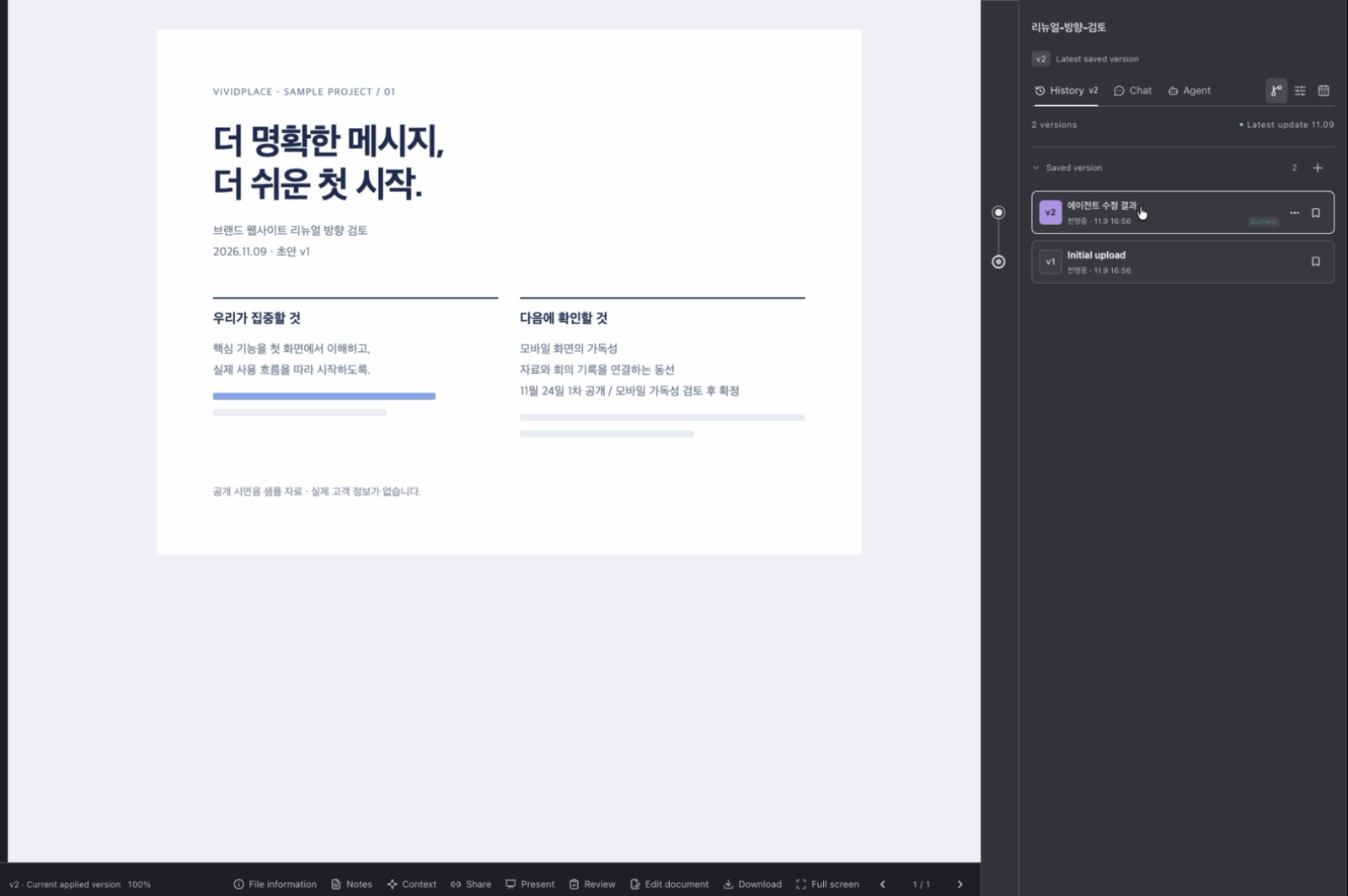
VersionOverwrite and it’s still there. Compare side by side anytime.
Scattered pieces,
Files, meetings, notes, screenshots. Right now they all live apart.
in one line.
Put them in the order they happened and you get the history of one document.
Link the keywords,
Key terms are pulled from every file. Same ones merge, related ones connect.
and answers appear.
Ask “Why change the banner?” and it follows the linked keywords down to the files behind the answer.
01 Problem
The work is done,
but the reasons sit in four places.
Folder6 files
final.pptx
final_meeting.pptx
FINAL_final_v2.pptx
Chat4:12 PM
LeadWhat did we decide about the banner again?
MeLet me find the meeting notes. Replied 22 min later
Meeting memoNov 6
Decision: revise main banner
Owner: Design
Reason: not written down
AI chatNew chat
MeThis project is a brand renewal, and last week we… Same explanation, third time
The files remain,
the reasons behind them vanish.
02 Concept
Versions, meetings, comments, AI edits.
One line, in the order they happened.
Nothing is filed away by type. Read it as one line and you can see which meeting led to which version.
- 10.28Versionv1 draftProposal first uploaded
- 11.01MeetingIn-person meeting, 42 minTranscript attached to v1
- 11.04Review1 pen mark · 2 notesComments left right on the screen
- 11.04Versionv2 AI revisionComments applied, original untouched
- 11.06MeetingOnline meetingDecision: design the banner for mobile
- 11.07Versionv3 currentMeeting decision applied
- 11.08ShareTeam-only linkLink stays the same across versions
03 Solution · Product
Where that history lives,
VividPlace.
Keep the document open while you compare versions, hand edits to the Agent, hold a meeting, and look up the evidence. Type a command and the scene follows.
03 Solution · Core
Don’t search. Ask.
Like asking a colleague who has read everything.
Documents and meeting notes, images and video too. VP Ask understands everything in the project, so a question gets you straight to the answer.
An example screen for illustration. It only searches files you have access to.
The more you add,
the denser the knowledge graph.
Keywords pulled from your files, and the links between them, grow into one graph per project. VP Ask follows that graph to find answers, and you can explore it yourself in the graph view.
Example graph · drag to rotate
Why Ask can answer
Because four things
are always kept.
Every screen below is the real app, recorded with a Korean sample project. Click to watch.
MeetingWhat’s said is transcribed and becomes that version’s meeting notes.
RevisionAsk the AI in plain words. The result comes back as a revision first.
EvidenceWhen VP Ask answers, it shows the files behind the answer.
04 Features
Nine tools,
every one leaves a record.
Versions that never vanish
Overwrite and earlier versions remain. Reopen them exactly as they were.
Review on the screen
Leave pen marks and notes on the real screen, not a screenshot.
Presentation mode
Present the document as is and point with a laser.
Captions and translation
Meet with the document open. Captions and translation follow along.
Import recordings
Bring in recorder and audio files, transcribe them, and turn them into notes.
Edit in your own apps
What you fix in a familiar app becomes the next revision.
Links that don’t change
The link you shared stays the same as versions move on.
Kept in Drive
Projects and earlier versions are also kept in Google Drive.
Mac · Windows · Web
Pick up the same project in the desktop app or the browser.
Continue in the AI you use
Claude, Codex.
Hand it off to the app you already use and keep going.
- 1Add one address…/mcp?profile=file
- 2Paste the task infoFiles, chats, and notes go along
- 3Save as a revisionA new revision appears on the same document
05 Value
For each person,
a different gain.
Makers
Edit
without worry.
- Earlier versions remain after you overwrite
- AI edits arrive as a revision first
- Versions continue even from your own apps
Reviewers
What you said
doesn’t disappear.
- Comments stay at that spot on the screen
- What’s said in meetings becomes the notes
- See in the next version whether it was applied
Successors
Inherit
the reasons, too.
- Ask “Why did it change?” and the answer comes with sources
- Files, notes, and comments live in one project
- Draft the handover from that record
06 Difference
Storage, collaboration, meeting notes.
Three separate things, on one document.
| Drive + chat | Docs collaboration | AI meeting notes | VividPlace | |
|---|---|---|---|---|
| Versions kept as history | Per file | Own docs only | ||
| Opens HWP, PPTX, PDF as is | Needs conversion | |||
| Comments right on the screen | Comments | |||
| Meeting notes attached to versions | Notes only | |||
| AI edits kept as revisions | ||||
| Ask across all files, answers with sources | File name, text | Within a meeting |
● Yes · ◐ Partial · ○ N/A. Based on typical use; varies by product and plan.
The loop
From record to reuse,
people and AI go around together.
VP × AI Agent
Project
context
Raw audioReferencesCommentsVersions
On PC, tablet, or phone
07 Pricing
Start free on your own.
Free
₩0
Personal space · 5GB storage · versions, review, sharing · basic AI allowance
Personal plan
Price to be announced
More storage and AI allowance
Team plan
Price to be announced
Team space · shared storage · permissions
Paid plans are in preparation. Prices will be announced at launch.